Running Apache Spark on OpenShift: A Hands-On Guide from Notebooks to Spark Operator
Author: Motohiro Abe, Monson Xavier
Introduction
Apache Spark is one of the most widely used engines for large-scale data processing. Running Spark on Kubernetes requires careful consideration of cluster setup, resource management, and job submission.
In this blog, we walk through how to run Spark on OpenShift using the Kubeflow Spark Operator, integrated with OpenShift AI for notebook-based development. We use Jupyter Enterprise Gateway to submit Spark jobs as SparkApplication CRs directly from a JupyterNotebook — running in cluster mode on OpenShift.
To demonstrate the setup, we use a real-world Telecom Call Detail Record (CDR) pipeline — extracting data from MySQL, transforming it, and writing results to object storage.
All manifests, notebooks, and setup instructions are available in the GitHub repository linked throughout this blog.
Acknowledgments
This project learned from and reused content from the following upstream repositories:
- Spark on OpenShift – Spark on OpenShift patterns and examples.
- Workbench images – Upstream workbench/Jupyter image build and usage (see Building an image).
- Kubeflow Spark Operator – Kubernetes operator for managing the lifecycle of Apache Spark applications.
- Integration with Kubeflow Notebooks – Integrating Kubeflow Notebooks with the Spark Operator
What is Apache Spark?
Apache Spark is an open-source distributed computing engine designed for large-scale data processing. It provides high-level APIs in Python, Scala, Java, and R, and supports batch processing, streaming, machine learning, and graph processing within a single framework.
A simple Spark application looks like this:
from pyspark.sql import SparkSession

spark = SparkSession.builder.appName("SimpleApp").getOrCreate()

df = spark.read.text("README.md")

num_lines = df.count()

print(f"Total lines: {num_lines}")

spark.stop()
The SparkSession is the entry point for all Spark operations. From here, you can read data, apply transformations, and write results — across a single machine or a distributed cluster without changing your code.
For more details, see the Apache Spark Official Documentation.
So, How Does Spark Work on OpenShift?
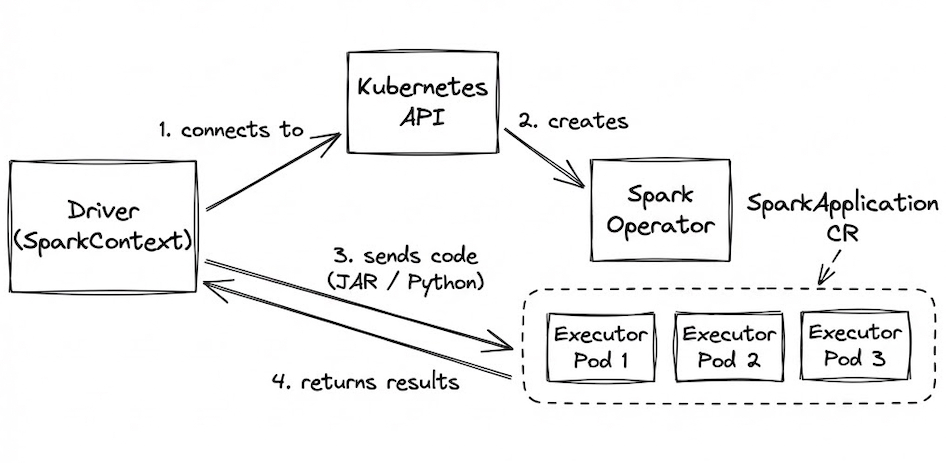
Spark applications run as a set of processes distributed across a cluster, coordinated by the Driver program via SparkContext.
When running on OpenShift:
-
The driver connects to the Kubernetes API.
-
The Spark Operator creates executor pods based on your
SparkApplicationCustom Resource (CR). -
Application code (JAR or Python files) is sent to the executors.
-
Executors run the tasks and return results to the driver.
Integration with Jupyter Enterprise Gateway
To run PySpark code directly from a JupyterNotebook on OpenShift AI, we add Jupyter Enterprise Gateway to the architecture. The notebook forwards execution requests to the gateway, which submits a SparkApplication CR to the Spark Operator on behalf of the user. Results are returned back to the notebook seamlessly.
For more details, see the Kubeflow Spark Operator — Integration with Kubeflow Notebooks.
Blog Structure
This blog is split into two parts:
Part 1 — Spark ETL from JupyterNotebook
You are building and testing Spark ETL logic from a familiar notebook interface. This section uses OpenShift AI JupyterNotebook with Jupyter Enterprise Gateway, which submits Spark jobs as SparkApplication CRs to the Spark Operator — running in cluster mode on OpenShift. We use a real-world Telecom CDR dataset to demonstrate the pipeline.
Part 2 — Spark ETL with Spark Operator
You are running a scalable, repeatable pipeline without a notebook interface. This section submits the same Telecom CDR pipeline directly as a SparkApplication CRD using the Spark Operator. Python job files are mounted from a ConfigMap, and Grafana is used for monitoring job performance and resource usage.
Part 1 — Spark ETL from JupyterNotebook
This section covers running Spark ETL logic from an OpenShift AI JupyterNotebook using Jupyter Enterprise Gateway. The gateway submits Spark jobs as SparkApplication CRs to the Spark Operator — running in cluster mode on OpenShift.
What You Will See in the Demo
The demo walks through a complete Spark ETL pipeline against Telecom Call Detail Record (CDR) data:
- Setting up Jupyter Enterprise Gateway to submit Spark jobs from the notebook
- Extracting CDR records from a MySQL database
- Transforming and writing Parquet files to object storage (MinIO/S3)
- Running analytics on the processed data
GitHub Repository
Full notebooks, manifests, and setup instructions are available here:
spark-etl-ods-demo
Part 2 — Production-Ready Spark with Operator
This section covers running the same Telecom CDR pipeline as a SparkApplication using the Spark Operator. Instead of submitting jobs from a notebook, workloads are submitted directly as SparkApplication CRDs — giving you more control over scaling and resource management.
What You Will See in the Demo
-
Submitting the ETL workload as a SparkApplication CRD
-
Mounting Python job files from a ConfigMap — no image rebuild needed for transformation changes
-
Submitting the analytics workload as a second SparkApplication
-
Monitoring job performance and resource usage with Grafana The overall flow looks like this:

GitHub Repository
Full manifests, SparkApplication CRDs, and runbook are available here: spark-etl-operator-demo
Conclusion
In this blog, we walked through two approaches to running Spark on OpenShift — from interactive notebook development using Jupyter Enterprise Gateway, to direct SparkApplication submissions with the Spark Operator.
The key takeaway is that the same ETL logic written in a JupyterNotebook can be promoted to a repeatable, scalable pipeline without rewriting your code. OpenShift AI provides the development environment, and the Spark Operator handles the rest.
We hope this gives you a practical starting point for running Spark on OpenShift. All code, manifests, and runbooks are available in the GitHub repositories linked throughout this blog.